ByIntent 本意 中文

ByIntent · 本意

A quiet pause,
the moment
you reach for it.

ByIntent is an iPhone app that runs entirely on your device. Before you open the few apps that are hardest to put down, it gives you one choice: not now, or open for N minutes on purpose. It never lectures you, never scores you, and never writes a line meant to make you feel bad.

On-device only · No network requests · Core features always free

Coming to the App StoreCurrently in TestFlight beta Want to join the beta?See the Support page
ByIntent’s Today screen in English on first launch: “Not guarding anything yet”, a large zero, three counters at zero, and a drawer with focus lengths of 30, 60 and 90 minutes.
Today — this is first launch, before you have guarded anything.
All on this phone Rules, events and the app tokens you picked live on this device only. Every core feature works with no account at all.
Zero network requests The app talks to no server. No telemetry, no third-party SDKs, no advertising identifier.
It cannot read your apps iOS hands over opaque tokens only. ByIntent cannot even read the names of the apps you picked, let alone what is inside them.
Core features stay free The intent gate, basic limits, emergency passes, export and deletion are always free — and will never move behind a paywall.

Three modes

Plan, Focus and Commitment mode
work at different layers.

Most apps in this category pile every switch onto one screen, so you can never tell what is actually in force. ByIntent has three things: Plan is the foundation, Focus is temporary pressure on top of it, and Commitment mode is a lock around both. Each card below answers the same three questions.

Plan

Standing rules

You set it once and it stays on. A daily total, a cap on how many times you may open, and hours that are simply closed — enforced on schedule, with nothing left for you to do.

What it governs
Daily quota, opens per day and off-hours for guarded apps
When it applies
Always on, enforced automatically
How to leave
Tightening applies at once; loosening waits 24 hours

Focus

A temporary push you start by hand

When you want a stretch of real quiet, tap once. For 30, 60 or 90 minutes every guarded app is closed; anything not on the guard list is unaffected. You can end it early whenever you want.

What it governs
Closes every guarded app for one stretch of time
When it applies
The moment you press Start yourself
How to leave
End early any time — recorded as “ended early”, nothing is cleared

Commitment mode

A lock on the rules themselves

It does not change your quota; it changes how easy it is to back out. Once on, an emergency pass waits 10 minutes and you get 1 a week. Turning it off takes 24 hours. It is off by default.

What it governs
How hard the rules are to change — no quota is touched
When it applies
Immediately when you turn it on
How to leave
Turning it off waits out a 24-hour cooling-off period
The three modes side by side. All three commitment levels use identical in-app numbers — going up adds locks outside ByIntent, not more friction inside it.
 PlanFocusCommitment mode
What it governs Daily quota / opens per day / off-hours Every guarded app closed for one stretch How hard the rules are to change
When it applies Always on, enforced on schedule The moment you press Start Immediately when turned on
How to leave Tightening at once; loosening waits 24 h End early any time, nothing cleared Turning it off waits 24 h
Effect on emergency passes None (5 min each · 3 a week · 30-second wait) None — passes stay available during a focus session Wait starts at 10 min · fixed at 1 a week
Any further levels? Level 2 borrows the system’s “Don’t Allow Deleting Apps”; level 3 mirrors your most important rule into the system’s Screen Time
How the three modes stack Commitment mode is a lock drawn around everything; inside it, Focus sits above Plan, which is the foundation. Commitment mode · the outer lock Focus Started by hand · 30 / 60 / 90 minutes of pressure Plan Standing rules · the foundation
Plan is the foundation; Focus presses down on it; Commitment mode locks both.
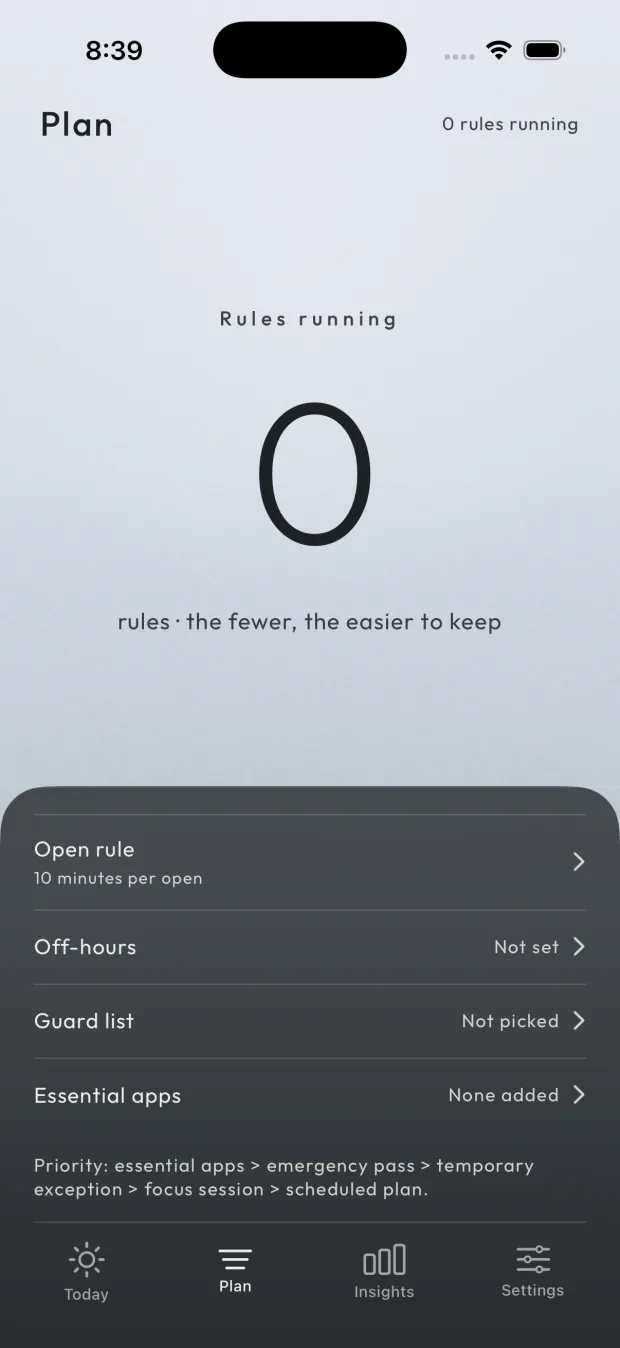
ByIntent’s Plan screen in English: the number of running rules, then rows for the open rule, off-hours, the guard list and essential apps, with the priority order printed underneath.
Plan — the fewer the rules, the easier they are to keep.

What one block looks like

Four steps, and none of them
need you to open ByIntent.

Everything happens in the system’s block layer and in notifications. The block screen is drawn by iOS and has room for a title, a subtitle, an icon and two buttons — that is the platform’s hard limit, so we spend it on saying the true thing clearly.

The four steps of one session Open a guarded app, meet the intent gate with “Not now” and “Open for 10 min”, get reminded when time is up, then answer one review question. 1 · You open a guarded app iOS lays ByIntent’s block screen over it 2 · The intent gate · two choices Not now Open for 10 min 3 · A reminder when time is up The quota runs out and guarding resumes on its own 4 · One line of review “Did you do what you meant to?” — no answer changes the rules You never have to open ByIntent for any of it
All four steps happen at the system layer; step 4 can simply be ignored.

Use it on purpose

Open #1 today · 40 min left of your quota

Not now
Open for 10 min
Illustration
The block screen is drawn by SpringBoard and cannot be screenshotted. This is a faithful redraw using the app’s exact wording, on the darkest stop of the current palette.

Design evidence

Every decision points at
a paper you can look up.

These five sources informed the design. They explain why ByIntent works the way it does; they are not a promise of any health outcome.

Gollwitzer, P. M. (1999). Implementation intentions: Strong effects of simple plans. American Psychologist, 54(7), 493–503.
doi.org/10.1037/0003-066X.54.7.493

→ The two-step intent gate. The finding: spelling out when and what in advance changes behaviour far more than resolve alone. So the block screen never asks “are you sure?” — it offers a choice measured in minutes: not now, or open for N minutes.

Grüning, D. J., Riedel, F., & Lorenz-Spreen, P. (2023). Directing smartphone use through the self-nudge app one sec. PNAS, 120(8), e2213114120.
doi.org/10.1073/pnas.2213114120

→ A short wait before opening. This randomised controlled trial found that inserting a brief forced pause before an app opens meaningfully reduces how often people go in. That is why the block screen is two-step: the first tap on “Open” only registers, and you tap again after a few seconds to actually enter. An emergency pass starts at a 30-second wait.

Wood, W., & Rünger, D. (2016). Psychology of Habit. Annual Review of Psychology, 67, 289–314.
doi.org/10.1146/annurev-psych-122414-033417

→ Off-hours cut the cue instead of the urge. Habits fire from context cues automatically, and beating them one at a time is expensive. Rather than fighting each impulse, close the window entirely — which is what the off-hours rule does.

Michie, S., Richardson, M., Johnston, M., Abraham, C., Francis, J., Hardeman, W., Eccles, M. P., Cane, J., & Wood, C. E. (2013). The Behavior Change Technique Taxonomy (v1) of 93 Hierarchically Clustered Techniques: Building an International Consensus for the Reporting of Behavior Change Interventions. Annals of Behavioral Medicine, 46(1), 81–95.
doi.org/10.1007/s12160-013-9486-6

→ Commitment mode and the 24-hour cooling-off period. The taxonomy lists commitment devices as a technique in their own right: you, now, closing a door on you, later. So loosening any rule takes 24 hours to take effect while tightening is immediate — which shuts the “change the rule, then walk through it” bypass.

World Health Organization. Addictive behaviours: Gaming disorder (ICD-11 Q&A).
who.int · Gaming disorder Q&A

→ Support for self-control, not a diagnosis. The WHO definition has a clear clinical threshold: impaired control, gaming taking precedence over other interests, sustained for at least 12 months with significant impairment. ByIntent deliberately stays outside that line. It helps you keep a boundary you set yourself. It is not screening, not a diagnosis, not treatment. If you are distressed, please talk to a professional.
Citation discipline: this page quotes published conclusions and their sources (author, year, journal, official link) only. It reproduces no text, figures or scale items, and it does not imply that any author or institution endorses ByIntent. Nothing here is medical advice.

Privacy and capability transparency

What we cannot do is on this page too.

For an app that watches how you use your phone, the important part is what it cannot see. The list on the right comes straight out of the in-app “What ByIntent can do” screen — every line is a real iOS boundary that applies to any app of this kind.

Your data stays on this phone

  • Four kinds of event only: opens, exits, passes, thresholds. No app content, names, screenshots or location.
  • The app makes no network requests at all: no telemetry, no third-party SDKs, no advertising identifier.
  • Screen Time data belongs to iOS. ByIntent can embed the system report but cannot read or store the numbers in it.
  • Export (events.jsonl) or delete everything at any time. Both are free, forever.

Read the full privacy policy →

What iOS does not let us do

  • Pick a purpose or run a countdown on the block screen itself
  • Pre-check apps for you, or read out app names
  • Bring the system’s usage numbers back into this app
  • Stop you from deleting ByIntent to escape the rules
  • Read content or chats inside other apps
  • Manage Channels or mini games inside WeChat

Partly: limiting websites (Safari and system WebView only).
Can: showing your purpose and today’s open count on the system block screen.
These are Apple’s boundaries, not our choices.

How it looks

Seven fog-grey palettes,
ordered by lightness.

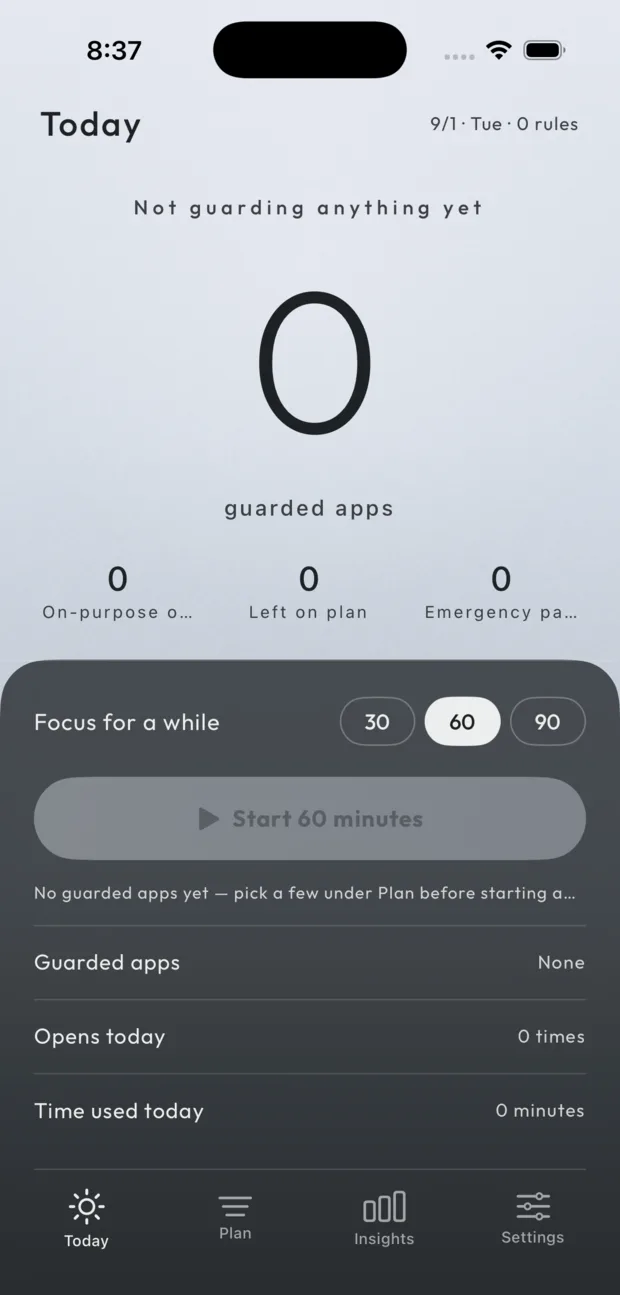
The seven palettes are told apart by lightness rather than hue, running from the lightest (Silver Mist) to the deepest (Bluestone), and each has a light and a dark set that follows the system. There is also a low-stimulation mode: no grain, no glow, no animation — flat colour only.

ByIntent’s Today screen in the light appearance.
Light appearance
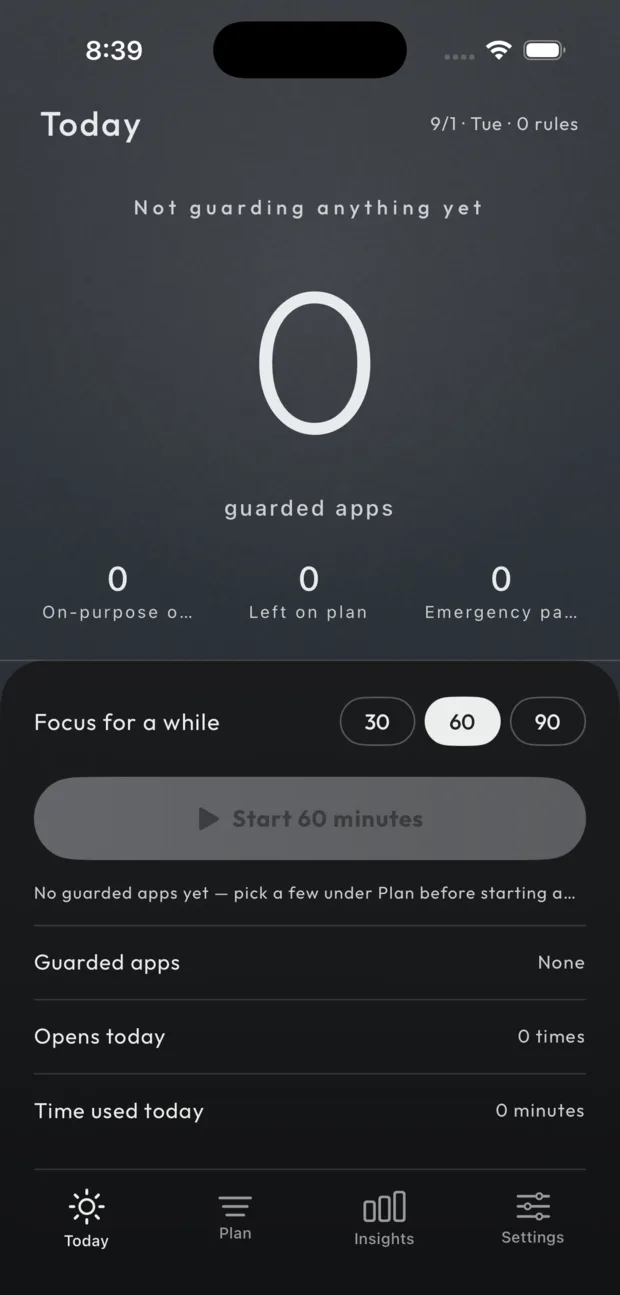
The same Today screen in the dark appearance: identical layout, the palette’s dark set of values.
Dark appearance — same slots, the other set of values

Pricing

The core is free, permanently.

The intent gate, basic limits, emergency passes, export and deletion are free forever and will never be moved behind a paywall. Emergency passes especially: they are a safety exit, not a selling point.

Core features

Free

  • The intent gate and the two-step block
  • Daily quota, opens per day, off-hours
  • Emergency passes (5 min each · 3 a week)
  • Focus and Commitment mode
  • Export events.jsonl and delete all history

Subscription

Coming later

More palettes and deeper insights are still being worked on; the exact benefits and price are not settled. What is settled: none of the five things above will move into it.

Any purchase happens inside the app, through Apple’s in-app purchase. This website sells nothing, collects no payment details, and offers no way to buy outside the App Store.